
Cut Planner · Windows · Android
How many MDF sheets does a wardrobe cut list need?
Free calculation
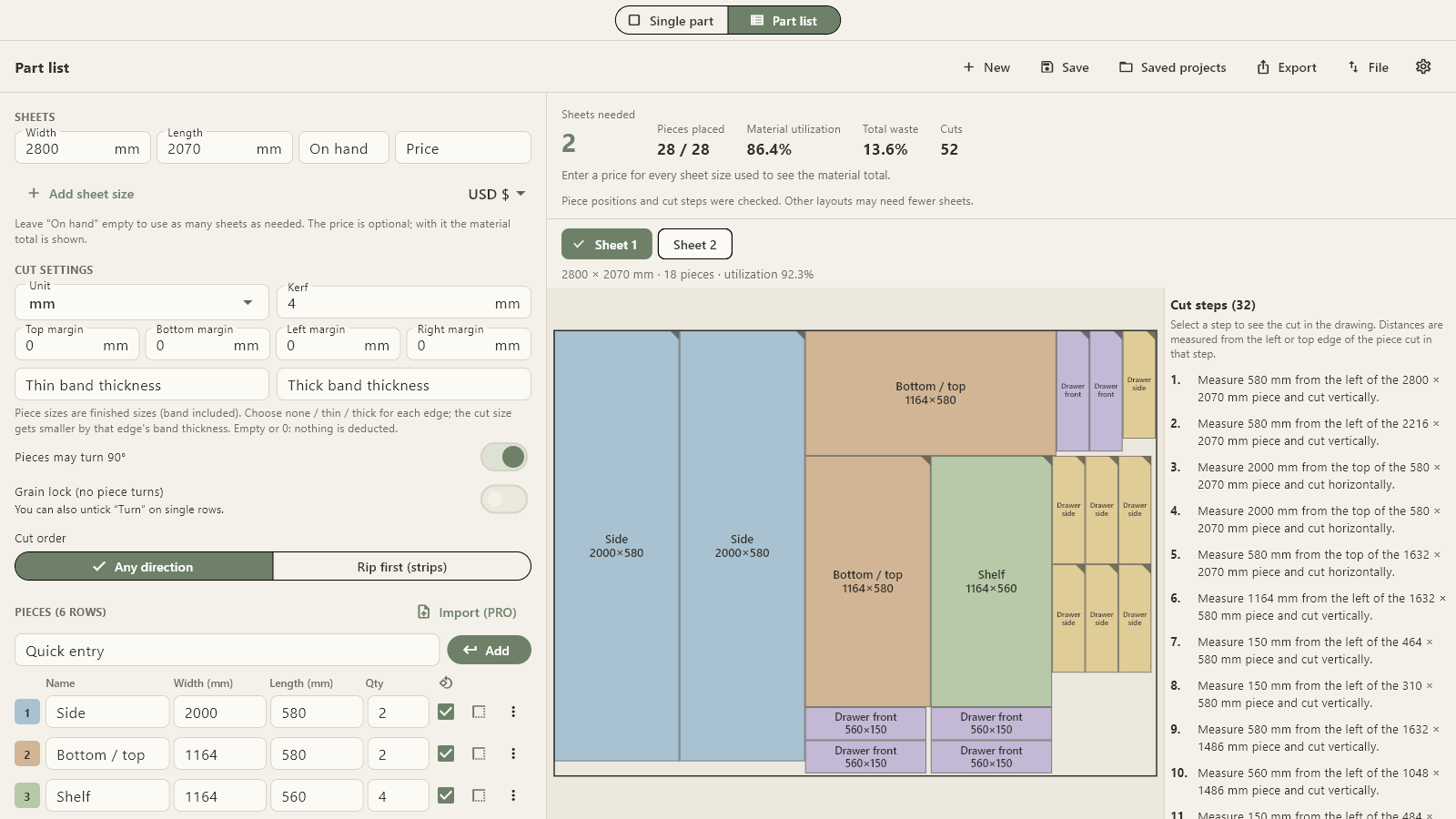
Enter each rectangular panel and its quantity in Cut Planner’s free part-list mode. It calculates the sheets needed and shows each layout with numbered cut steps. This example uses 28 wardrobe panels and fits them on two sheets; your result depends on the dimensions, kerf, margins and rotation choices.
Worked examples
 (opens the larger image)
The example cut list
- 2 sides — 2000 × 580 mm
- 2 bottom/top panels — 1164 × 580 mm
- 4 shelves — 1164 × 560 mm
- 2 doors — 1960 × 596 mm
- 6 drawer fronts — 560 × 150 mm
- 12 drawer sides — 500 × 150 mm
Sheet size is 2800 × 2070 mm, kerf 4 mm, and all four edge margins are zero. Rotation is allowed and grain lock is off in this example. The layout needs two sheets and leaves no unplaced panels.
Set up the calculation
- Open Part list and enter the six rows with width, length and quantity.
- Add your available sheet size and enter the actual kerf and edge margins. Change turning and grain settings to suit the panels.
- Calculate, inspect each sheet and follow the numbered cutting steps. Save a PDF, image or CSV for free.
Scope and limits
This is a sample cut list, not a furniture construction drawing. Check joints, hardware allowances and finished dimensions for your design. Stock tracking, free-form nesting and one-dimensional bar cutting are outside this calculation. The layout is not guaranteed to be mathematically optimal.
Questions about this job
Can I import my Excel cut list?
CSV and XLSX bulk import and clipboard import require PRO. Manual entry and CSV export are free.
Can I allow for edge bands?
Yes. Enter finished dimensions, choose no/thin/thick band per edge and set both thicknesses. Cutting-size allowance and band marks on the plan/PDF are free.
Why can my sheet count differ?
Different dimensions, quantities, edge margins, kerf, available stock or grain/rotation settings change which layouts fit. Compare those inputs with the example before relying on its count.