
by Pavutu · Windows app · Türkiye
Track your salary, extra-lesson pay and tax bracket together
A Turkish-language app for permanent state-school teachers in Türkiye. Estimate your pay, follow your tax bracket and compare with your payslip.
Get the app

 (opens the larger image)
Follow your tax bracket
See your calculated tax bracket and how it may change through the year, based on the details you enter:
- Your calculated tax bracket: the taxable income built up by the end of the month you choose, and its rate.
- What's left before the next bracket: how much taxable income remains before the next one.
- The estimated month of the change: the year view shows each month's estimated bracket and when the move is expected.
The yearly estimate assumes your profile details stay the same all year. If you enter the previous months' taxable income from your payslip, the calculation continues from that amount.
 (opens the larger image)
The screens come from the Windows app, shown with sample data and its Turkish interface. Results are estimates based on what you enter and don't replace your official payslip. Select an image to read the detail.
From your details to the monthly calculation
Enter your details once, and the salary and extra-lesson pay for the month you choose are worked out line by line.
-
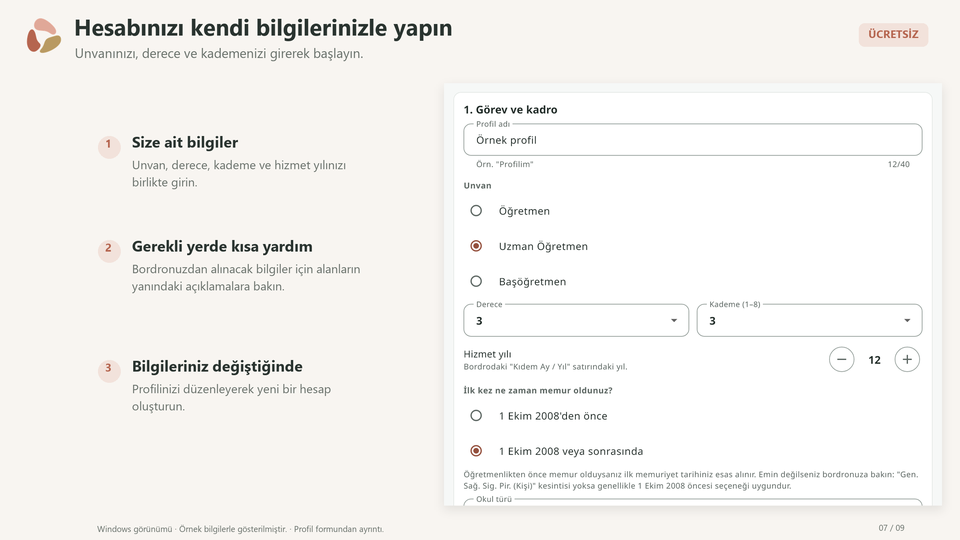
Enter your details
Enter your title, grade and step, years of service and lesson details. Short notes beside the fields tell you what to take from your payslip.
 (opens the larger image)
Profile details · free -
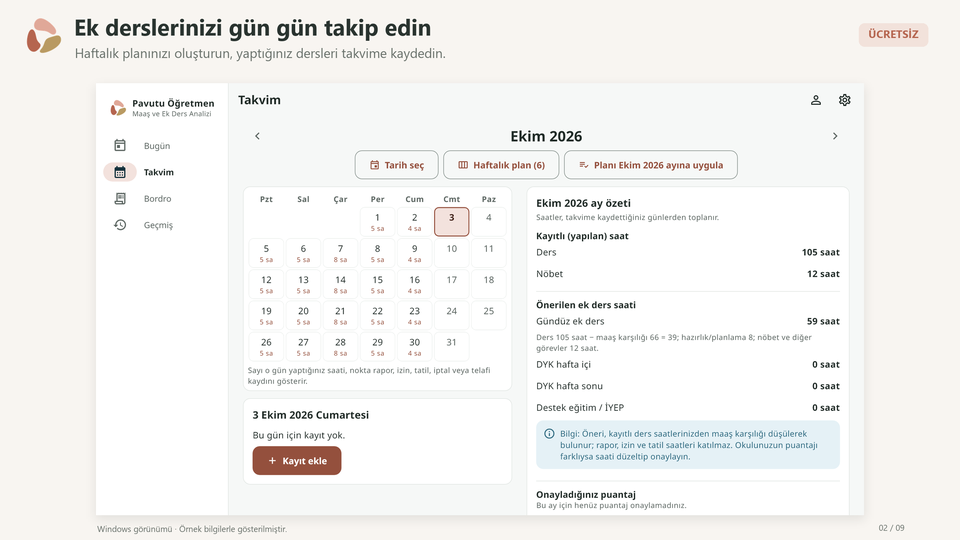
Record extra lessons on the calendar
Set up your weekly plan and apply it to the month, or record days one by one. The month summary suggests the extra-lesson hours; you confirm the hours to be paid from your own timesheet.
 (opens the larger image)
Lesson calendar and month summary · free


Compare with your payslip and keep your reports
Put your calculation next to your payslip, go back to earlier months and take a monthly report as a PDF.
-
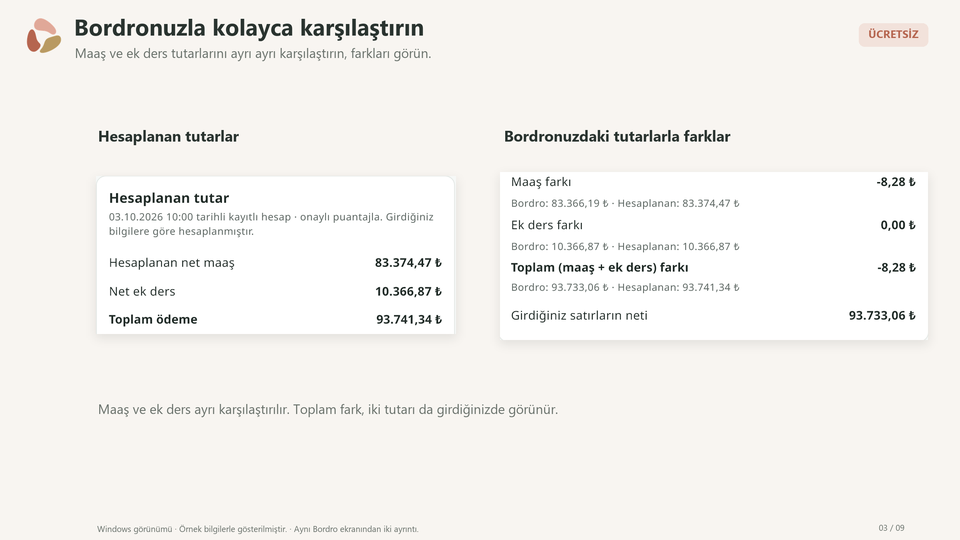
Compare with your payslip
Enter the net salary and extra-lesson pay from your payslip; the app compares each with its own calculation and shows the difference.
 (opens the larger image)
Payslip comparison · free -
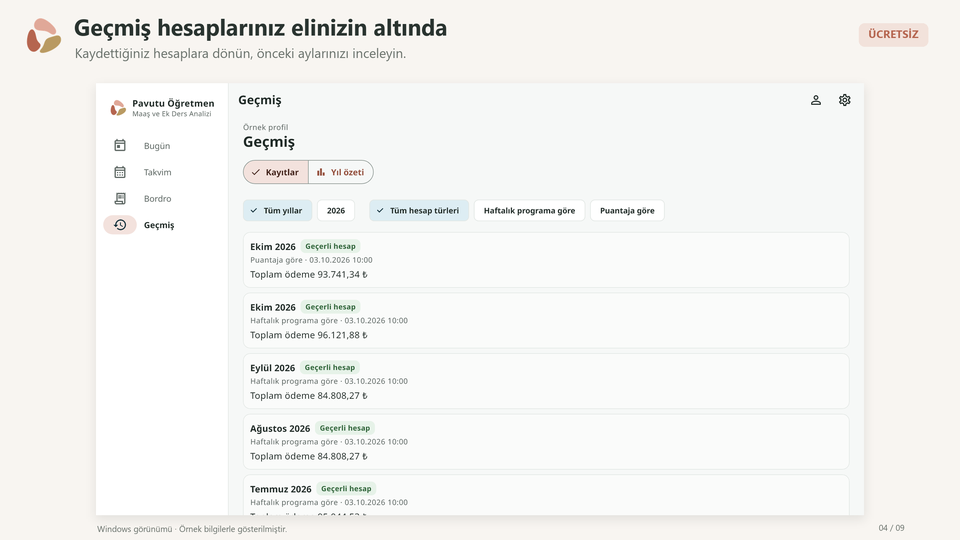
Go back to past calculations
Filter your saved calculations by year and calculation type, and look back at earlier months.
 (opens the larger image)
Past calculations · free -
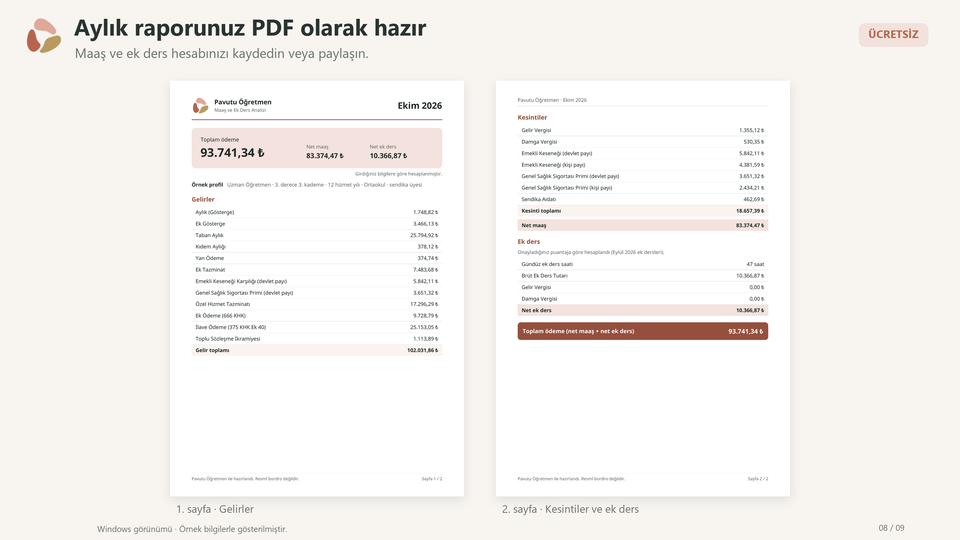
Monthly PDF report
Save or share each month's salary and extra-lesson calculation as a PDF: income, deductions, extra-lesson pay and the total.
 (opens the larger image)
Two-page PDF report · free


The app doesn't connect to your bank, the Ministry of Education's systems, e-Devlet or any payroll system; you type in the amounts it compares. A calculation can follow your weekly programme or the timesheet you confirm, which is why the amounts in the sample screens differ.
Windows PRO
Try different situations and see the year as a whole
PRO makes it easier to keep records and compare them; the method and result of the calculation are the same as in the free version.
-
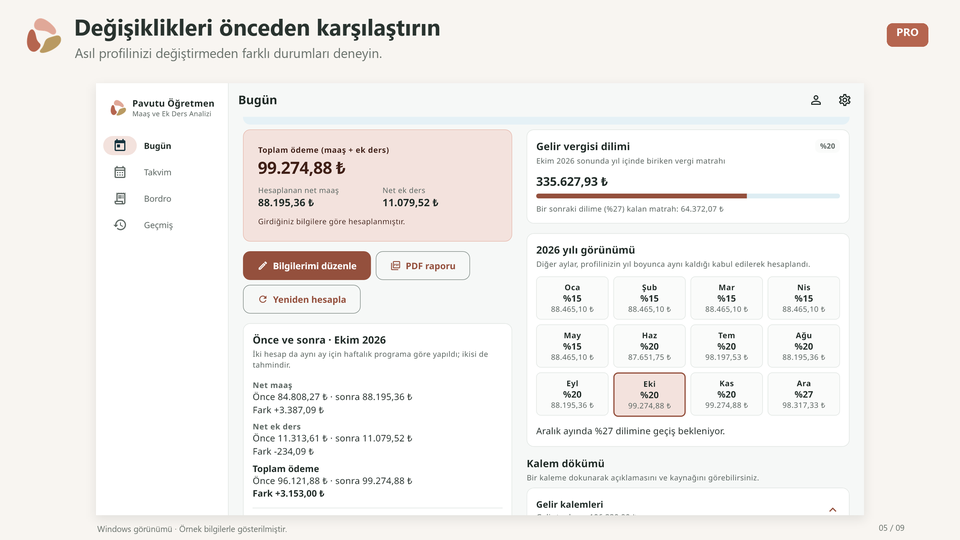
Scenarios
Change your grade, step or lesson details without touching your main profile, and compare before and after.
 (opens the larger image)
Scenario comparison · PRO -
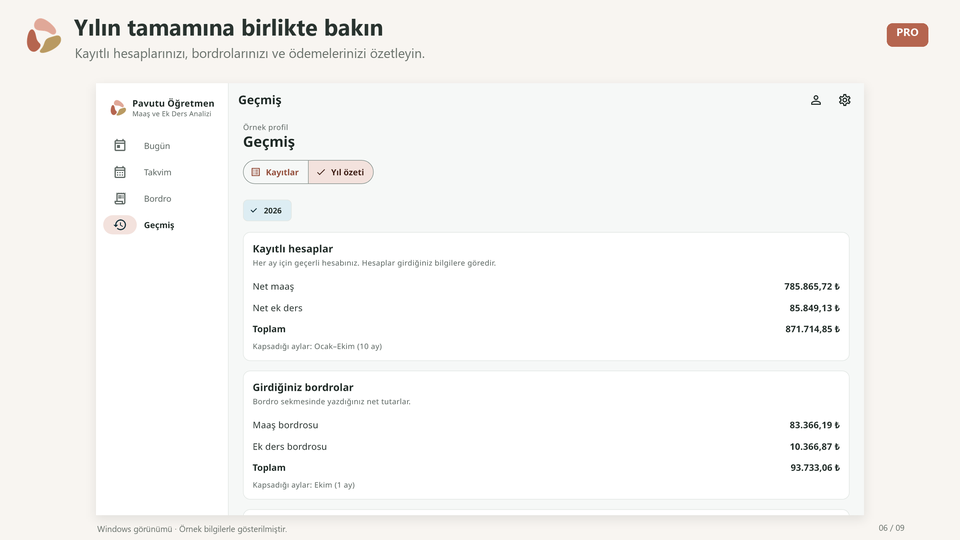
Year summary
See the yearly totals of your saved calculations, the payslips you entered and your payments.
 (opens the larger image)
Year summary · PRO


The year summary adds up your saved calculations, payslips and payments. The year view in the tax bracket section is a forward-looking estimate, and it's free.
Free and PRO
Free
For one profile, always
- Salary and extra-lesson calculation
- Tax bracket and yearly estimate
- Lesson calendar, weekly plan and timesheet
- Comparison with your payslip and bank payments
- Past calculations and the monthly PDF report
- Backup and restore
Windows PRO
Everything in the free version, plus:
- Additional profiles and profile copies
- Scenarios: before-and-after comparison
- Year summary
PRO is a one-time in-app purchase through the Microsoft Store. There's no subscription and no advertising, and the Microsoft Store shows the current price.
Platform and privacy
Platform
Pavutu Öğretmen is an app you install on your Windows PC; it is made for Türkiye and its interface is Turkish. The Windows version is out on the Microsoft Store. The Android and iOS versions aren't in the app stores yet. For questions, email support@pavutu.com.
- Windows
- Türkiye only
- Turkish interface
Privacy
No sign-up, no ads and no usage tracking. Your profile, calculations, calendar and the payslip records you enter stay on your device, and the calculator and PDF work offline. Buying PRO and checking the licence go through the Microsoft Store. Records on the device and backup files aren't encrypted.
Who it's for
Permanent teachers at state schools in Türkiye. Salary calculations for contracted (sözleşmeli), hourly-paid (ücretli) and private-school teachers aren't covered. Your official payslip is what counts.
FAQ
Which teachers is it for?
Permanent teachers at state schools in Türkiye. Salary calculations for contracted, hourly-paid and private-school teachers aren't covered.
How does it show my tax bracket?
It shows the taxable income built up by the end of the month you choose, the bracket it falls in and how much is left before the next one. The year view shows each month's estimated bracket and when the move is expected.
Why might the result differ from my payslip?
The app works from the details you enter and its own calculation assumptions. Your school's timesheet, a change during the month, a deduction or rounding can lead to a different amount on your payslip. The payslip screen is there so you can see the difference.
Why do the weekly-programme and timesheet calculations differ?
A weekly-programme calculation estimates from your plan; a timesheet calculation uses the extra-lesson hours you confirmed for that month. If the hours differ, so does the amount.
Does it connect to my payslip or bank account?
No. You enter payslip amounts and bank payments by hand. The app doesn't connect to banks, the Ministry of Education's systems, e-Devlet or any payroll system.
Do I need PRO?
No. The calculator, tax bracket, calendar, payslip comparison and PDF report are free. PRO adds extra profiles, scenarios and the year summary; it's a one-time purchase with no subscription.
Where is my data stored?
On your device. The app has no server and no sign-up system. To move your records to another device you take a file backup from the app; that file isn't encrypted.
Other Pavutu tools
Other Pavutu tools: Offline Scanner for scanning documents, Static QR for QR codes, Cut Planner for sheet cutting plans, and Pavutu İş Araçları for quotes, receipts and shipping paperwork. See all our tools →