
by Pavutu
Cut Planner — sheet cutting plans from your part list
Enter rectangular parts of different sizes to see how many sheets you need and the numbered cut steps. Save the plan as a PDF or image for free.
Get the app


 (opens the larger image)
Free exports and single-size layouts
Screenshots are from the Windows version; sizes, results and prices are examples. Click or tap a screenshot to read the details.
-
Free
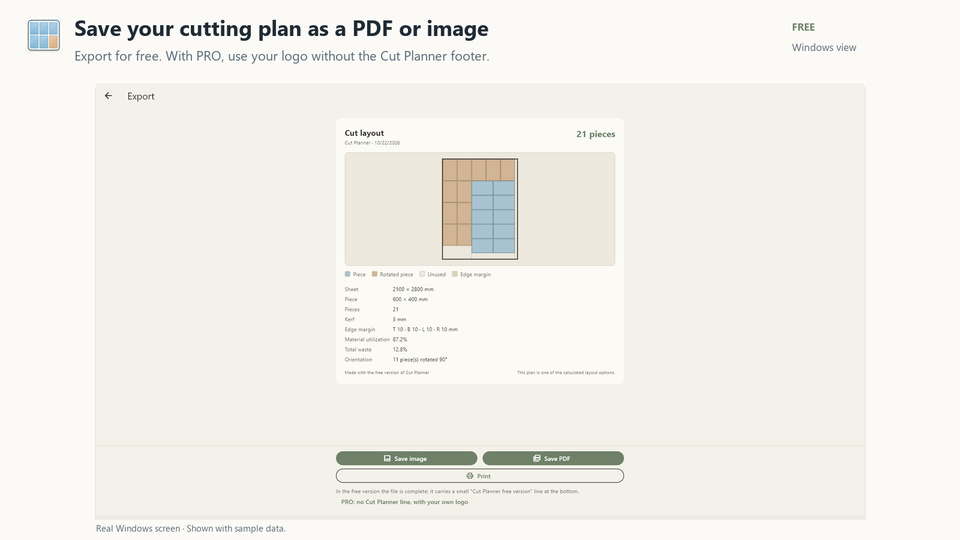
Save as a PDF or image
A part list PDF includes the parts table, the plan for each sheet and the cut steps. Image export has a length limit; use PDF for long plans.
 (opens the larger image)
Save your plan as a PDF or image for free. With PRO, remove the Cut Planner footer and add your own logo. -
Free
How many pieces fit on a sheet?
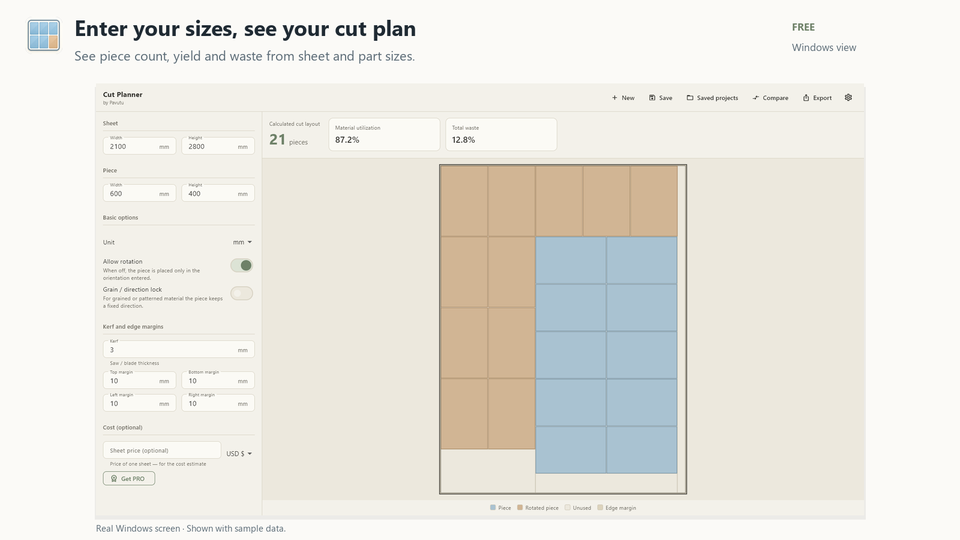
For one part repeated many times, use single-part mode: the count, utilization, waste and the 2D plan appear together.
 (opens the larger image)
Enter sheet and piece sizes to see how many pieces fit, material utilization and waste.


PRO
Circle, ellipse and capsule parts
With PRO you can lay out parts with rounded outlines too. The count, plan, utilization and waste appear just as they do for rectangles.
Circles, ellipses and capsules use one shape and size per calculation; part lists with different sizes are available for rectangles.
-
Circle
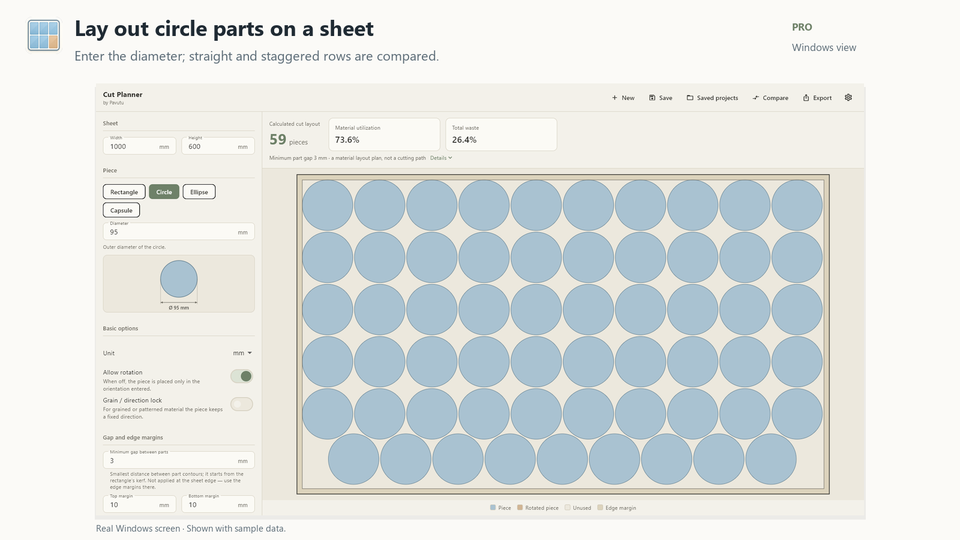
Enter the diameter; circles of that size are arranged across the sheet.
 (opens the larger image)
With PRO, arrange circular pieces on a sheet and calculate the count, material utilization and cost. -
Ellipse
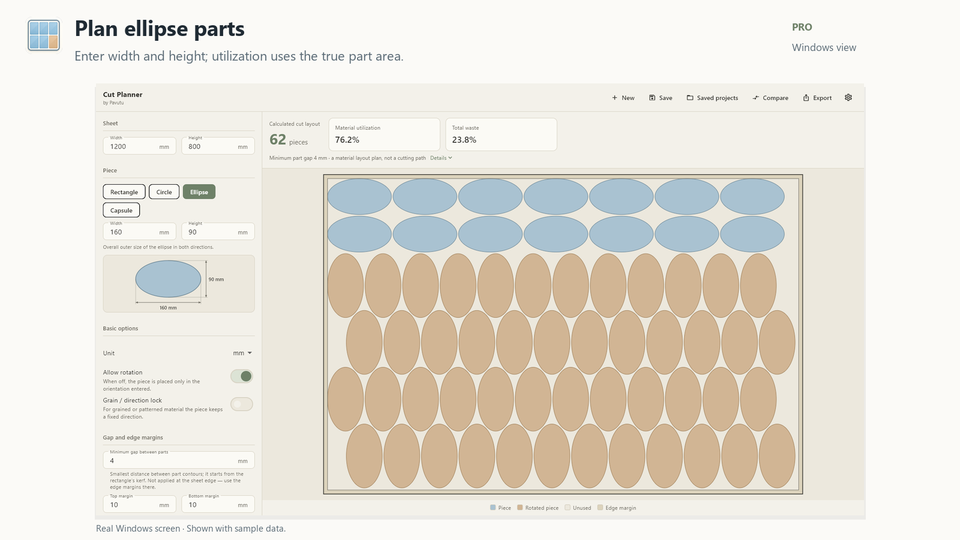
Enter the width and length. Allow rotation to place ellipses at 90° as well.
 (opens the larger image)
With PRO, enter ellipse dimensions to see the layout, piece count and material utilization. -
Capsule
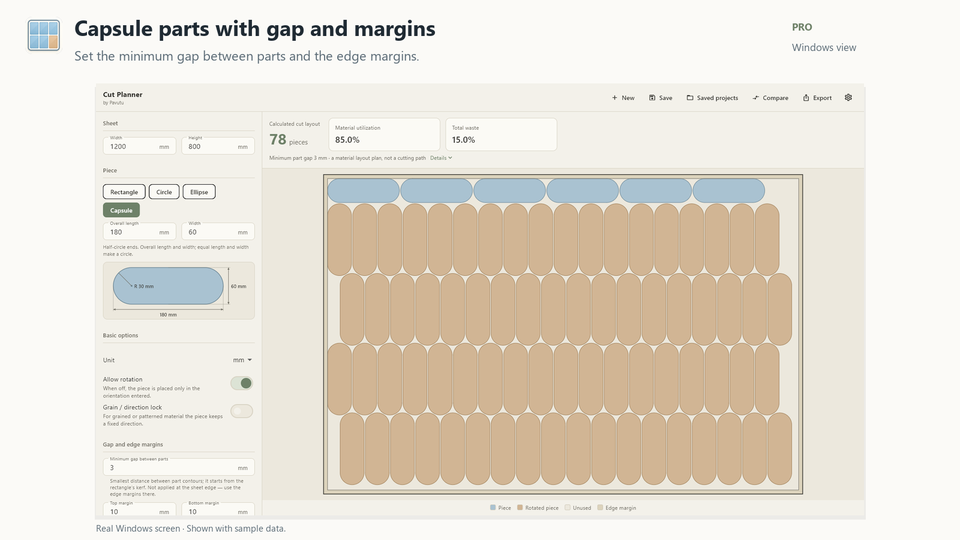
Enter the overall length and the width; the ends are semicircles.
 (opens the larger image)
With PRO, plan capsule-shaped pieces and set their length, width and spacing.


Spacing and edge margins
The minimum spacing between parts is the shortest distance left between the edges of two parts; at the sheet's edge, the edge margins apply instead. This spacing is a separate setting from the kerf used for rectangles. Utilization is worked out from the parts' actual area, and cost, comparison, saving and PDF / image export work with shapes too.
Allowances, layout and sheet comparison
Chipboard, MDF, plywood, acrylic or glass: the kerf and edge margins apply in both modes.
-
Free
Kerf and edge margins
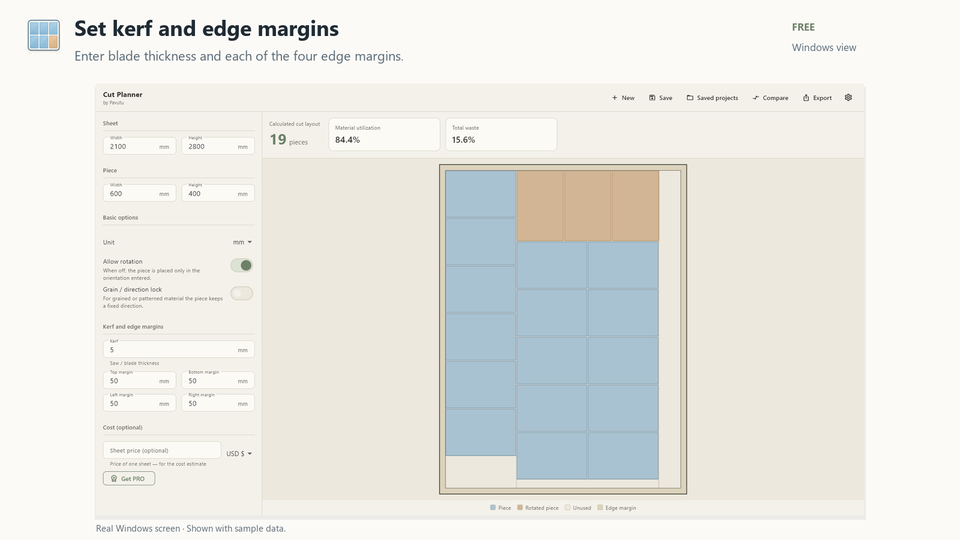
You choose whether a part may turn by 90° and which way the grain runs.
 (opens the larger image)
Set the cutting allowance and four edge margins to suit your material. -
Free
Inspect the layout
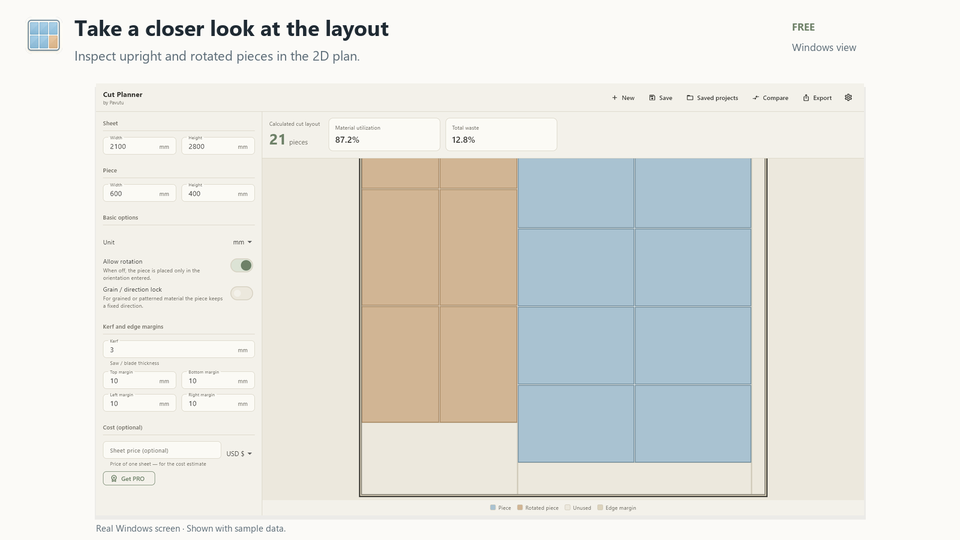
Inspect the sheet layout, rotated parts and remaining space.
 (opens the larger image)
Inspect the piece layout on the sheet and zoom in for a closer look. -
Free
Compare sheets
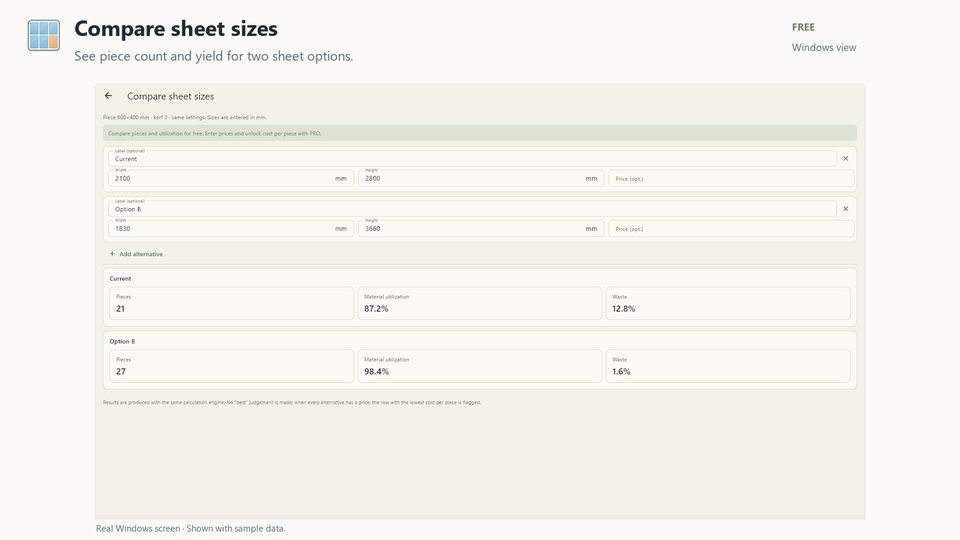
In single-part mode, try the same part on different sheet sizes. The part list does not have this comparison.
 (opens the larger image)
Compare sheet sizes by piece count, material utilization and waste for free. With PRO, see the cost per piece too.


Cost
PRO
Cost per piece and waste cost
Enter sheet prices to see the total material cost for the sheets used in your part list for free. PRO adds costs per row and per piece, waste cost, and cost per piece when comparing sheets in single-part mode.
Prices in the screenshot are examples, not the price of the app or of PRO.
 (opens the larger image)
Free and PRO
Free
For planning rectangular parts
- Part lists with different sizes, the sheets needed and numbered cut steps
- Several sheet sizes; kerf, edge margins, turning and grain lock
- Count, utilization, waste and sheet comparison in single-part mode
- PDF and image export (with a small Cut Planner line at the bottom), CSV export
- Up to 10 saved jobs; save a job to a file and back up
PRO
Everything in the free version, plus:
- Circle, ellipse and capsule parts
- Exports without the Cut Planner line, with your workshop name and logo
- Cost per row and per piece, and waste cost
- Bulk import from CSV or Excel (XLSX) files and the clipboard
- Unlimited saved jobs
PRO is a one-time purchase through Microsoft Store on Windows or Google Play on Android, with no subscription. The current price appears in the relevant store. Microsoft Store and Google Play purchases are separate.
Get the app
Cut Planner is on the Microsoft Store for Windows and on Google Play for Android.
Platform and privacy
Platform
The Windows version is on the Microsoft Store and the Android version is on Google Play. The app's interface is in English, Turkish and Spanish; the language, number format, unit and currency are set separately. For questions, email support@pavutu.com.
- Interface: English · Turkish · Spanish
- mm · cm · m · inch
Privacy
No account and no sign-in; calculating and saving work offline. Your measurements and job names stay on your device and aren't sent to Pavutu. The PRO licence is checked through Microsoft Store on Windows and Google Play on Android.
What it doesn't do
There is no stock tracking, SVG / DXF import or export, freehand drawing, shapes from photos or 1D / bar cutting. It gives you a sheet plan and cut steps; it doesn't produce tool paths for CNC or CAM.
FAQ
Does it guarantee the best possible layout?
No. The app gives you a practical cutting plan; it doesn't guarantee the mathematically best layout or any particular material saving.
Can I plan parts of different sizes together?
Yes, for rectangular parts. In the part list you enter each part's name, width, length and quantity; the app lays them out on the sheets needed and shows numbered cut steps for each sheet. Circles, ellipses and capsules (PRO) are in single-part mode, with one shape and one size per calculation.
Do I have to pay to save a PDF or image?
No. Saving as a PDF or image is free; free exports have a small Cut Planner line at the bottom. With PRO that line goes away and you can add your workshop name or logo. Image export has a length limit; use PDF for long plans.
Does it export DXF, SVG or CNC files?
No. Exports are PDF, image and CSV for the part list; it doesn't produce machine tool paths.
Do I need an internet connection?
Not for calculating or saving. Buying PRO and checking the licence go through Microsoft Store on Windows and Google Play on Android. If the store cannot be reached, PRO remains available for up to 14 days after its last confirmation.
Is there a subscription?
No. PRO is a one-time purchase in the relevant platform’s store. Microsoft Store and Google Play purchases are separate.
I already own PRO. Do I need to pay again for the PRO features in version 2.0?
No. Your existing PRO licence also covers the PRO features in version 2.0.
Can I use it on Android?
Yes. Cut Planner is on Google Play. On Android, PRO is a one-time purchase through Google Play; a PRO purchase on the Microsoft Store does not carry over to Android.
Which languages does the app support?
The interface is in English, Turkish and Spanish. You can change the language in the app's settings; the number format, unit and currency are set separately from the language.
Other tools by Pavutu
Other Pavutu tools: Offline Scanner for scanning documents, Static QR for QR codes, Pavutu İş Araçları for quotes and receipts and Pavutu Öğretmen for teachers' salary and extra-lesson pay in Türkiye. See all our tools →